Tag: AI

  • What Are Context Markers? Why Should You Care?

    I’m currently working on a SaaS where I needed to share context across folders.

    The Problem

    Imagine the following setup:

    /home/daniel/projects/work/
    │
    ├── AGENTS.md                       # Work-level instructions
    │
    ├── shared-context/
    │   ├── AGENTS.md                   # Shared-context instructions
    │   └── healthcare/
    │       └── domain.md               # Shared healthcare knowledge
    │
    ├── test-project/
    │   ├── AGENTS.md                   # Project-level instructions
    │   ├── src/
    │   │   └── AGENTS.md               # Source-specific instructions
    │   └── README.md
    │
    └── healthcare-app/
        ├── AGENTS.md                   # Zoa project instructions
        ├── emr-app/
        └── strategy/

    How do you access the context in shared-context/healthcare/domain.md when working within healthcare-app/

    AGENTS in the sub-directory override any rules written in the parent directory. But the context/healthcare/domain.md is not loaded when necessary when you prompt within the healthcare-app/

    Solution:

    When adding a project in ChatGPT Desktop (Codex), add the working directory first. This will be set as primary. Now, add the folder that you like to share the context from.

    Verification

    “How do you verify whether context is loaded?”, might you ask. Here is where context marker helps.
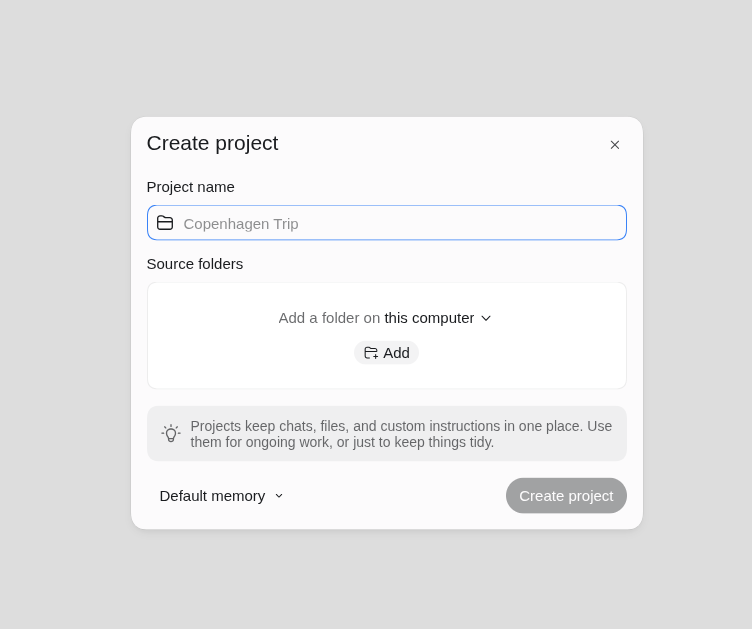
    Context marker is an arbitrary string that Codex adds when asked to any file (ideally markdown).

    Here is how a context marker would look like when added.

    File: shared-context/healthcare/domain.md

    Context marker: SHARED-CONTEXT-5638

    To verify whether the files are loaded, ask Codex the following:

    Without reading any files, report the context markers already available in your instructions.

    Codex will then list the context markers from the loaded files.

    Use Context markers only to test context discovery. You don’t need to add context markers to every document.
  • What Is Ansible?

    Do you find setting up servers hard, each time, you move to a different hosting provider from your previous hosting service Looking to automate setting up multiple servers doing the same tasks repeatedly?

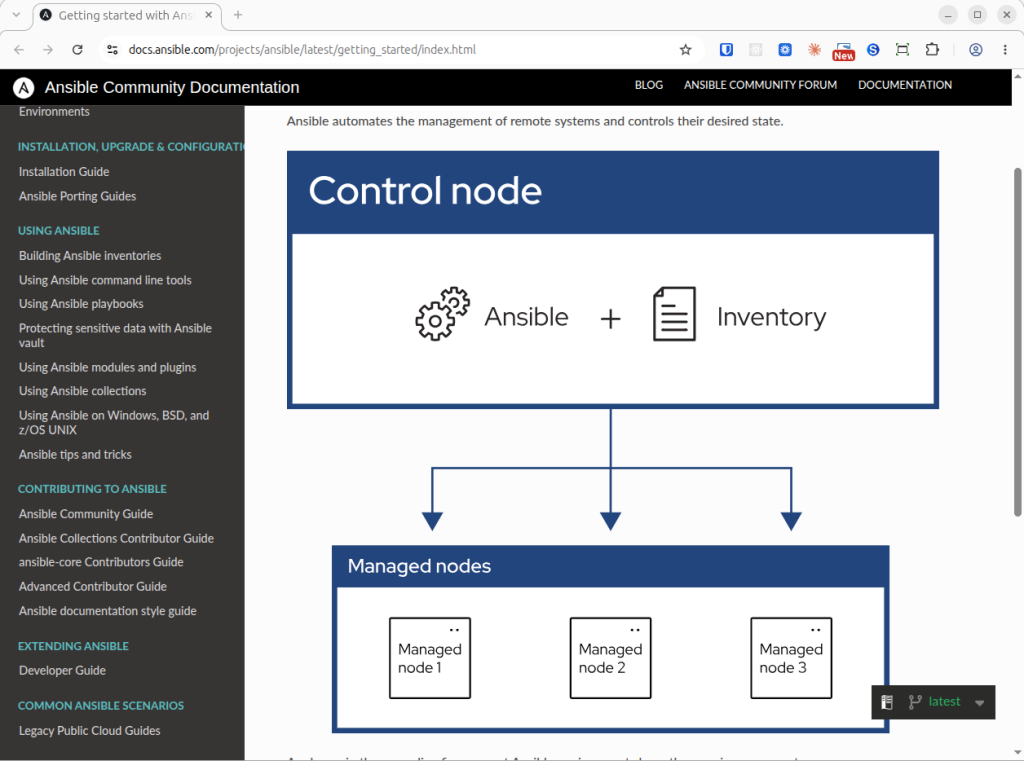
    Well, Ansible is your answer. Ansible automates the management of remote nodes and controls their desired state.

    Ansible environment has three main components.

    1. Control node
    2. Inventory
    3. Remote node(s)

    Control Node

    Control node is where Ansible is installed and shall be run to manage the remote nodes.

    Inventory

    Inventory is the list of manged nodes that are logically organized.

    Remote Node(s)

    Remote node(s) are server instances that Ansible controls.

    Take my case of moving to Amazon Lightsail for example. In my case, AWS Lightsail instance is the Remote node. Control node shall be my personal computer where I installed Ansible to control the remote nodes. Inventory is a list of managed nodes that are logically organized.

    Installing Ansible In Control Node

    Ansible can be installed using the APT (Advanced Package Tool) package management system in Ubuntu. Refer the installation guide.

    sudo apt update
    
    sudo apt install software-properties-common
    
    sudo add-apt-repository --yes --update ppa:ansible/ansible
    
    sudo apt install ansible

    Scaffolding Ansible

    I’ve scaffolded Ansbile using Codex. inventory.yml is the starting point in Ansible. Note that Ansible supports both formats — .ini and .yml

    ansible/
    ├── ansible.cfg
    ├── requirements.yml
    ├── inventory.example.yml
    ├── vars.example.yml
    ├── site.yml
    ├── .gitignore
    ├── README.md
    └── roles/
        └── admin_user/
            ├── tasks/main.yml
            └── templates/sudoers.j2

    inventory.yml is the template for server’s IP, user & the private key.

    File: ansible/inventory.yml

    ---
    all:
      children:
        wordpress:
          hosts:
            BT_Marketing_Prod_Web_01:
              ansible_host: REPLACE_WITH_STATIC_IP
              ansible_user: ubuntu
              ansible_ssh_private_key_file: /absolute/path/to/private-key.pem
              ansible_python_interpreter: /usr/bin/python3
    

    Replace placeholders with actual values in var.yml when you use variables.

    Once ready, you can verify whether Ansible is able to connect to the remote node(s) using the following command.

    ansible BT_Marketing_Prod_Web_01 -m ansible.builtin.ping -e '{"ansible_become": false}'

    This will get you started with Ansible. Use your playbook to your imagination!

    You may ask, “Why do we need Ansible when one can create and use skills available AI assisted development tools”. After all, AI solves repetitive tasks, right?

    Creating workflows using Ansible give you bullet-proof reliability. You can use such tools to leverage Ansible. Choose workflows over handing tasks to AI assisted tools.

  • How To Write Effective Prompts?

    No matter which AI Assisted development tool (ChatGPT Codex, Cursor, etc.) you use, writing effective prompts will yield better outcomes.

    I learnt that a prompt must structure information across six parts.

    1. Goal
    2. Constraints
    3. Coverage
    4. Output format
    5. Unknowns & choices
    6. Action boundary (Guardrail)

    I previously wrote about moving to Amazon Lightsail from Utho, my existing Cloud service provider. Let us use that scenario as an example to build the prompt.

    Imagine asking Codex to list the steps involved to setup production website on Amazon Lightsail using LEMP. Here is how the prompt looks:

    List the steps needed to set up a production WordPress website on an Amazon Lightsail instance using LEMP: Linux, Nginx, MySQL, and PHP.

    Use a plain Ubuntu instance rather than a preconfigured WordPress image. Check current official documentation for supported versions and instructions.

    Cover:

    • Setting up SSH access, a non-root sudo user, and firewalls.
    • Installing and configuring Nginx, MySQL, PHP-FPM, and the PHP extensions WordPress needs.
    • Creating a dedicated WordPress database and database user.
    • Installing WordPress with WP-CLI and setting appropriate file ownership and permissions.
    • Configuring Nginx for WordPress, including permalinks and PHP handling.
    • Enabling HTTPS with automatic certificate renewal.
    • Configuring backups, security updates, and basic monitoring.
    • Verifying the setup and troubleshooting common errors.

    Present the steps in execution order. For each step, explain its purpose, provide the commands or Lightsail console actions, and describe how to verify success. Clearly mark placeholders such as the domain name and IP address. Explain any choices that depend on budget or expected traffic.

    Only provide the instructions; do not create resources or make changes.

    Now, let us look how the prompt is structured across the six parts listed above.

    Goal

    List the steps needed to set up a production WordPress website on an Amazon Lightsail instance using LEMP: Linux, Nginx, MySQL, and PHP.

    Constraints

    Use a plain Ubuntu instance rather than a preconfigured WordPress image. Check current official documentation for supported versions and instructions.

    Coverage

    Lists the topics the answer must include, from setting up SSH access through backups and monitoring.

    Output Format

    Requesting steps in execution order, with purpose, commands or console actions, and verification.

    Unknowns

    Clearly mark placeholders such as the domain name and IP address. Explain any choices that depend on budget or expected traffic.

    Action Boundary

    Only provide the instructions; do not create resources or make changes.

    You don’t need to provide all parts in a prompt each time. However, having them all yields better results. Give it a try!

  • My Next Career Progression And Why?

    Most of my career, over the last 15 years, has been spent on software coding & implementation.

    To move up the career ladder, there are four areas that I need to consider:

    1. Coding & implementation
    2. Architecture & technical decisions
    3. Collaboration & leadership
    4. Strategy, planning & analysis

    My next career progression should not only involve coding & implementation but also technical decisions, leadership and strategy planning. This puts me in the Senior Product Engineering roles and I can then naturally progress in leadership directions — Engineering lead, Engineering manager & then to Head of Engineering roles.

    To make the next move more relevant and to stay ahead I must evolve in to AI frontier roles that involve the above areas. The AI frontier demands the knowledge of RAG and enterprise knowledge systems, Agentic AI and orchestration, AI evaluation and production engineering and Forward Deployed Engineering (FDE).

    The knowledge of the above systems would then allow me to look for Senior AI Product Engineer, Applied AI Engineer, AI Applications Engineer, and Forward Deployed Engineer roles in addition to the Senior Product Engineer roles.

  • Micro1: What & Why Should You Care?

    Micro1: What & Why Should You Care?

    In recent times, the term Micro1 is gaining traction in Reddit. I am writing this post to understand what Micro1 is and why should one care?

    Micro1, founded by Ali Ansari, is an AI powered talent and recruiting platform. Micro1 also helps AI companies to train their models by providing training data.

    Zara is the core product at Micro1 that vets candidates and conducts early-stage interviews at scale.

    At Micro1, Talent marketplace exists and connects vetted engineers, domain experts and professionals with companies.

    Why Should You Care?

    Micro1 has raised $35 million in Series A funding and the company’s gross annual run rate is $500 million.

    There are three major reasons why professionals are paying attention to Micro1.

    1. Micro1 provides the human expertise to evaluate complex model outputs at scale.
    2. The business model scales because Micro1 recruits specialists as contractors rather than permanent employees.
    3. Micro1 is constantly expanding services beyond recruitment.

    All these are strong indicators for skilled professionals to be part of Micro1.