Do you find setting up servers hard, each time, you move to a different hosting provider from your previous hosting service Looking to automate setting up multiple servers doing the same tasks repeatedly?
Well, Ansible is your answer. Ansible automates the management of remote nodes and controls their desired state.
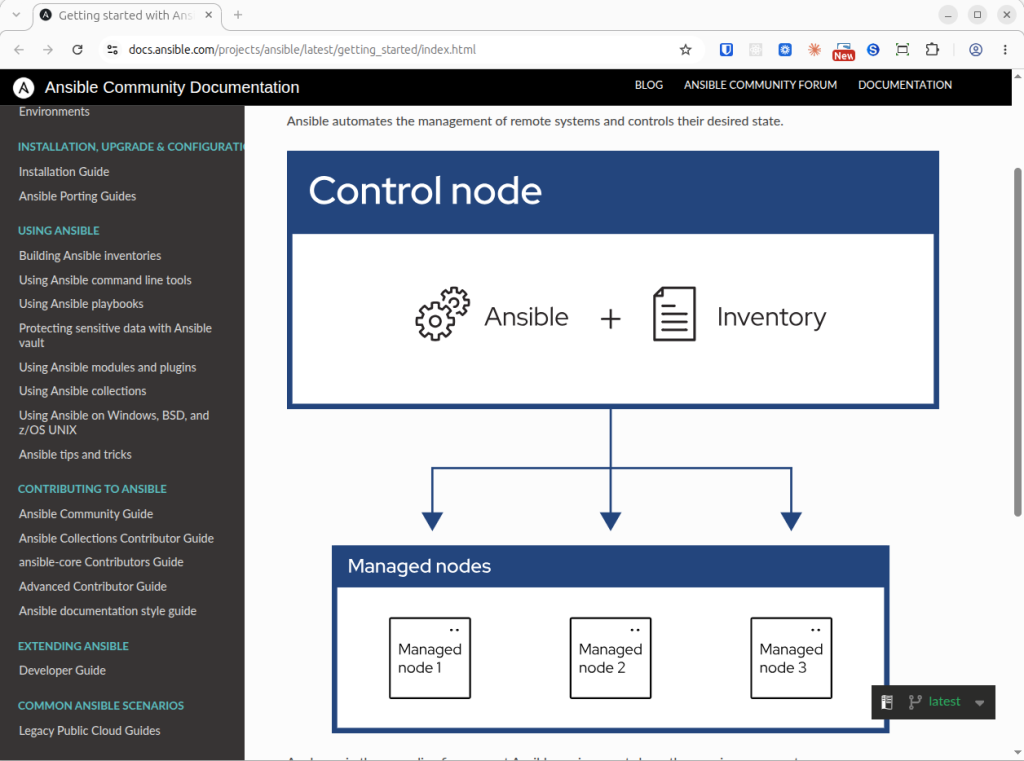
Ansible environment has three main components.
- Control node
- Inventory
- Remote node(s)
Control Node
Control node is where Ansible is installed and shall be run to manage the remote nodes.
Inventory
Inventory is the list of manged nodes that are logically organized.
Remote Node(s)
Remote node(s) are server instances that Ansible controls.
Take my case of moving to Amazon Lightsail for example. In my case, AWS Lightsail instance is the Remote node. Control node shall be my personal computer where I installed Ansible to control the remote nodes. Inventory is a list of managed nodes that are logically organized.
Installing Ansible In Control Node
Ansible can be installed using the APT (Advanced Package Tool) package management system in Ubuntu. Refer the installation guide.
sudo apt update

sudo apt install software-properties-common

sudo add-apt-repository --yes --update ppa:ansible/ansible

sudo apt install ansible
Scaffolding Ansible
I’ve scaffolded Ansbile using Codex. inventory.yml is the starting point in Ansible. Note that Ansible supports both formats — .ini and .yml
ansible/
├── ansible.cfg
├── requirements.yml
├── inventory.example.yml
├── vars.example.yml
├── site.yml
├── .gitignore
├── README.md
└── roles/
    └── admin_user/
        ├── tasks/main.yml
        └── templates/sudoers.j2
inventory.yml is the template for server’s IP, user & the private key.
File: ansible/inventory.yml
---
all:
  children:
    wordpress:
      hosts:
        BT_Marketing_Prod_Web_01:
          ansible_host: REPLACE_WITH_STATIC_IP
          ansible_user: ubuntu
          ansible_ssh_private_key_file: /absolute/path/to/private-key.pem
          ansible_python_interpreter: /usr/bin/python3
Replace placeholders with actual values in var.yml when you use variables.
Once ready, you can verify whether Ansible is able to connect to the remote node(s) using the following command.
ansible BT_Marketing_Prod_Web_01 -m ansible.builtin.ping -e '{"ansible_become": false}'This will get you started with Ansible. Use your playbook to your imagination!
You may ask, “Why do we need Ansible when one can create and use skills available AI assisted development tools”. After all, AI solves repetitive tasks, right?
Creating workflows using Ansible give you bullet-proof reliability. You can use such tools to leverage Ansible. Choose workflows over handing tasks to AI assisted tools.
Leave a Reply